



实现效果:
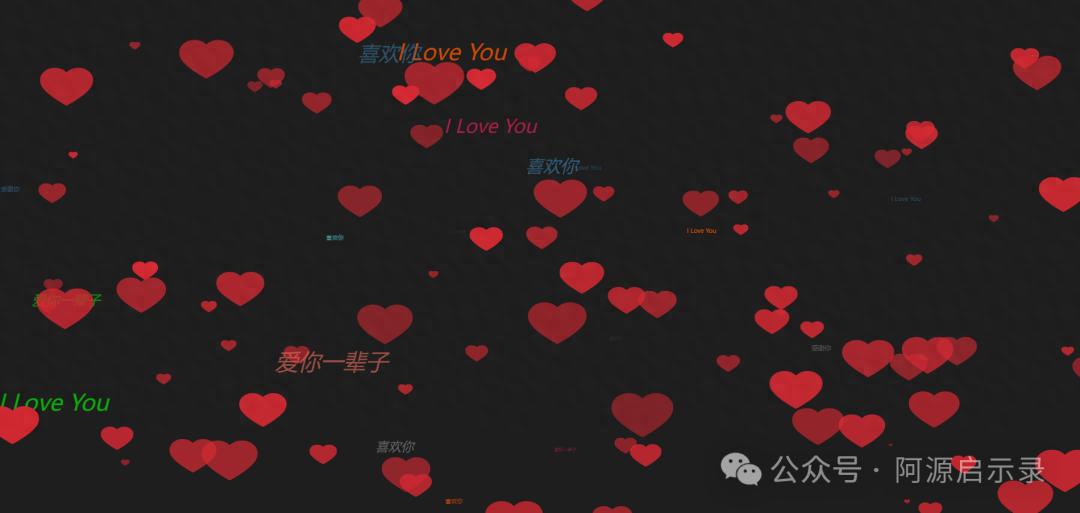
介绍
html5 canvas制作七夕520表白,全屏的爱心和表白语网页动画代码,浪漫的520爱心表白动画特效。
技术栈
HTML5 canvas + CSS3 + JS
代码:
<!DOCTYPE html><html lang="en"><head><meta charset="UTF-8"><title>七夕520爱心表白</title><style>*{margin:0; padding:0;}body{ background-color: #1E1E1E; }</style></head><body><canvas id="drawHeart"></canvas><script>var hearts = [];var canvas = document.getElementById(drawHeart);var wW = window.innerWidth;var wH = window.innerHeight;// 创建画布var ctx = canvas.getContext(2d);// 创建图片对象var heartImage = new Image();heartImage.src = img/heart.svg;var num = 100;init();window.addEventListener(resize, function(){wW = window.innerWidth;wH = window.innerHeight;});// 初始化画布大小function init(){canvas.width = wW;canvas.height = wH;for(var i = 0; i < num; i++){hearts.push(new Heart(i%5));}requestAnimationFrame(render);}function getColor(){var val = Math.random() * 10;if(val > 0 && val <= 1){return #00f;} else if(val > 1 && val <= 2){return #f00;} else if(val > 2 && val <= 3){return #0f0;} else if(val > 3 && val <= 4){return #368;} else if(val > 4 && val <= 5){return #666;} else if(val > 5 && val <= 6){return #333;} else if(val > 6 && val <= 7){return #f50;} else if(val > 7 && val <= 8){return #e96d5b;} else if(val > 8 && val <= 9){return #5be9e9;} else {return #d41d50;}}function getText(){var val = Math.random() * 10;if(val > 1 && val <= 3){return 爱你一辈子;} else if(val > 3 && val <= 5){return 感谢你;} else if(val > 5 && val <= 8){return 喜欢你;} else{return I Love You;}}function Heart(type){this.type = type;// 初始化生成范围this.x = Math.random() * wW;this.y = Math.random() * wH;this.opacity = Math.random() * .5 + .5;// 偏移量this.vel = {x: (Math.random() - .5) * 5,y: (Math.random() - .5) * 5}this.initialW = wW * .5;this.initialH = wH * .5;// 缩放比例this.targetScale = Math.random() * .15 + .02; // 最小0.02this.scale = Math.random() * this.targetScale;// 文字位置this.fx = Math.random() * wW;this.fy = Math.random() * wH;this.fs = Math.random() * 10;this.text = getText();this.fvel = {x: (Math.random() - .5) * 5,y: (Math.random() - .5) * 5,f: (Math.random() - .5) * 2}}Heart.prototype.draw = function(){ctx.save();ctx.globalAlpha = this.opacity;ctx.drawImage(heartImage, this.x, this.y, this.width, this.height);ctx.scale(this.scale + 1, this.scale + 1);if(!this.type){// 设置文字属性ctx.fillStyle = getColor();ctx.font = italic + this.fs + px sans-serif;// 填充字符串ctx.fillText(this.text, this.fx, this.fy);}ctx.restore();}Heart.prototype.update = function(){this.x += this.vel.x;this.y += this.vel.y;if(this.x - this.width > wW || this.x + this.width < 0){// 重新初始化位置this.scale = 0;this.x = Math.random() * wW;this.y = Math.random() * wH;}if(this.y - this.height > wH || this.y + this.height < 0){// 重新初始化位置this.scale = 0;this.x = Math.random() * wW;this.y = Math.random() * wH;}// 放大this.scale += (this.targetScale - this.scale) * .1;this.height = this.scale * this.initialH;this.width = this.height * 1.4;// -----文字-----this.fx += this.fvel.x;this.fy += this.fvel.y;this.fs += this.fvel.f;if(this.fs > 50){this.fs = 2;}if(this.fx - this.fs > wW || this.fx + this.fs < 0){// 重新初始化位置this.fx = Math.random() * wW;this.fy = Math.random() * wH;}if(this.fy - this.fs > wH || this.fy + this.fs < 0){// 重新初始化位置this.fx = Math.random() * wW;this.fy = Math.random() * wH;}}function render(){ctx.clearRect(0, 0, wW, wH);for(var i = 0; i < hearts.length; i++){hearts[i].draw();hearts[i].update();}requestAnimationFrame(render);}</script></body></html>代码仓库:
https://github.com/sunyctf/js-effects
评论 (0)